Guides
Charts
Plotly figures for one lap and for two, keeping the library’s caveats: refused pairs, frozen data, close minisectors.
lapbox.plot draws the results with Plotly. It is optional: nothing else in lapbox imports Plotly, and the figures are plain plotly.graph_objects.Figure objects you can restyle, show, or save. They keep the library’s caveats — a pair that couldn’t be matched is drawn without its gap, frozen car data is shaded, close minisectors are grey.
Install
pip install "lapbox[plot]"Without Plotly, import lapbox.plot raises an ImportError that says what to install.
Two laps
import fastf1
from lapbox.plot import channel_traces, speed_delta, track_dominance
from lapbox.telemetry import compare

session = fastf1.get_session(2025, "Silverstone", "Q")
session.load(weather=False, messages=False)
ver = session.laps.pick_drivers("VER").pick_fastest().get_telemetry()
nor = session.laps.pick_drivers("NOR").pick_fastest().get_telemetry()
result = compare(ver, nor, driver_a="VER", driver_b="NOR")

result.plot(channels=["Speed", "Throttle", "Brake", "nGear"]).show()
speed_delta(result).show()
track_dominance(result, ver).show()
channel_traces(ver, driver="VER").show()
Comparison.plot (the same as comparison) draws the time gap on top — above zero, driver A is ahead — then both drivers’ channels on the shared distance axis:
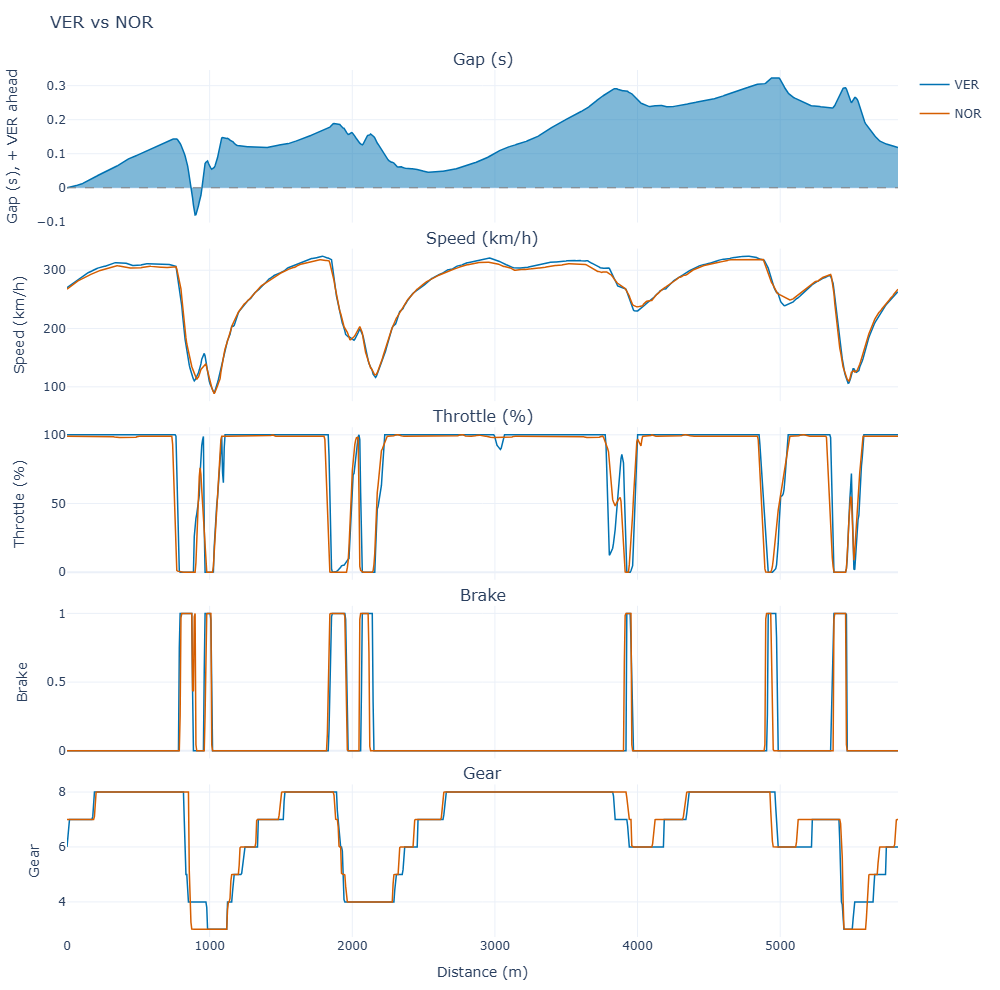
result.plot(channels=["Speed", "Throttle", "Brake", "nGear"])track_dominance colours driver A’s racing line by who took less time through each minisector. Minisectors decided by less than 20 ms are grey: too close to call (change it with tie_margin=).
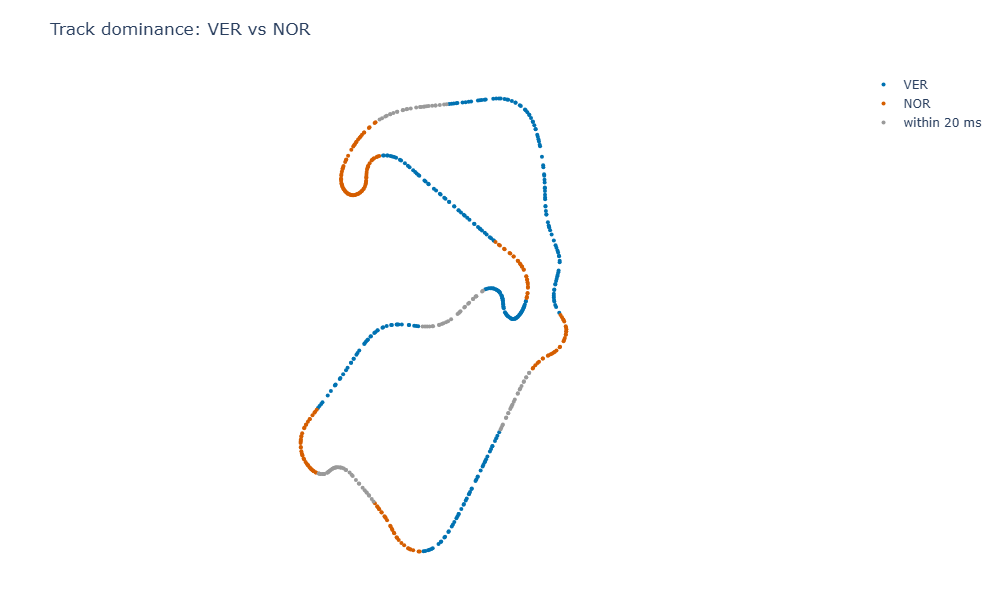
track_dominance(result, ver)speed_delta plots A’s speed minus B’s along the lap, and channel_traces draws one lap on its own.
A pair that can’t be compared
When Comparison.matched is False, the figures say why instead of drawing a gap that would describe the mismatch:
china = fastf1.get_session(2026, "China", "Q")
china.load(weather=False, messages=False)
alb = china.laps.pick_drivers("ALB").pick_fastest().get_telemetry()
bot = china.laps.pick_drivers("BOT").pick_fastest().get_telemetry()
refused = compare(alb, bot, driver_a="ALB", driver_b="BOT")

refused.plot(channels=["Speed", "Throttle"]).show()
speed_delta(refused).show()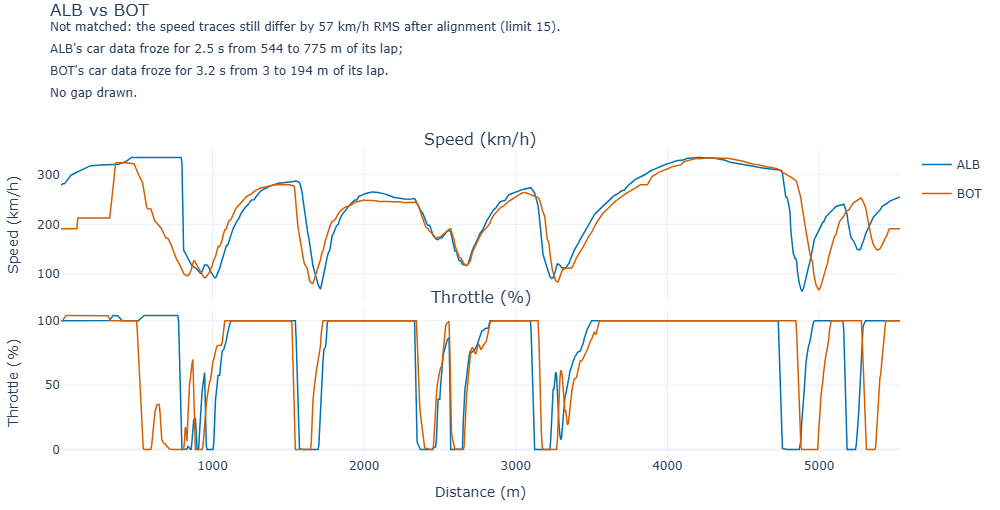
Frozen car data, shaded
channel_traces(bot, channels=["Speed", "Throttle", "RPM", "nGear"], driver="BOT").show()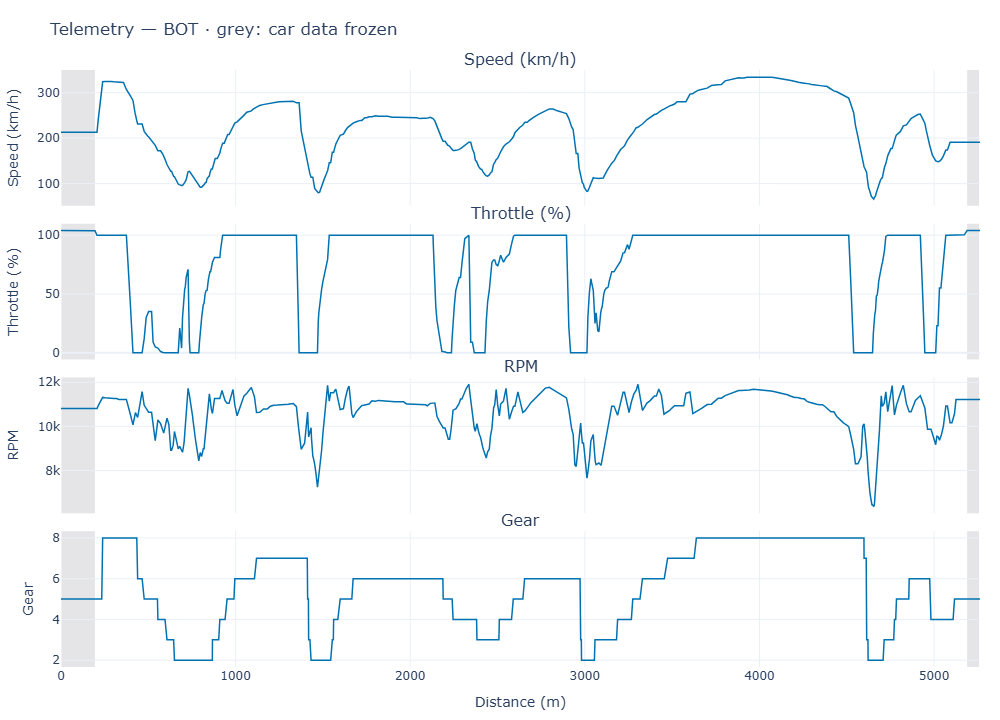
See Frozen car data for what these are.
Saving and styling
fig = result.plot()
fig.write_html("ver-nor.html")
An HTML file keeps the figure interactive. For PNG or SVG, Plotly’s fig.write_image() needs the kaleido package (the charts on these pages were made that way, in the example notebook). The figures use Plotly’s white template and a colour-blind-safe blue and orange; change anything with fig.update_layout(...).
These docs describe lapbox 0.1.0. Something wrong or missing? Open an issue.